Instagram Cleanup 2026: The Complete 30-Minute Account Audit Guide
A 30-minute Instagram cleanup covers four areas: follower quality, your following list, published content, and the recommendation feed. Cleaning each one improves engagement rate, reduces algorithmic penalties from ghost followers, and makes your time on the platform more intentional. No extra budget, no third-party app installs — just a structured pass through settings you already have.
Instagram accounts collect clutter the same way a desk does. Followers go inactive. Old Highlights look pixelated. The recommendation feed drifts toward content that wastes time instead of adding value. Most users notice the symptoms — lower reach, stale engagement, longer screen time — but never connect them to account hygiene.
This guide gives you a repeatable audit you can finish in one sitting. Each step has a time box, a clear action, and a reason it matters for reach, engagement, or mental health.
What an Instagram cleanup actually fixes
Before opening the app, it helps to understand what a cleanup changes and what it cannot change.
| Problem | Cleanup fixes it? | How |
|---|---|---|
| Low engagement rate | Yes | Removing ghost followers raises the ratio of active followers to total followers |
| Declining reach | Partially | A cleaner follower base sends better signals to the algorithm, but content quality still matters |
| Cluttered feed | Yes | Unfollowing and muting irrelevant accounts reduces noise |
| Addictive recommendation loop | Yes | Marking content as "Not interested" retrains the algorithm |
| Outdated profile appearance | Yes | Archiving old posts and refreshing Highlights improves first impressions |
| Shadowban | No | Shadowbans are caused by policy violations, not follower quality |
A cleanup is maintenance, not a growth hack. It creates a healthier baseline so that the content you publish afterward performs closer to its potential.
What are ghost followers on Instagram?
Ghost followers are accounts that follow you but never interact with your content. They sit on your follower list, inflate the count, and dilute every engagement metric the algorithm uses to decide how far your posts travel.
Not every ghost follower looks the same. Understanding the types helps you decide what to remove and what to leave alone.
| Type | What it looks like | How it got there | Remove? |
|---|---|---|---|
| Inactive accounts | Real person, has posts, but stopped using Instagram months or years ago | Followed you organically, then abandoned the platform | Yes — they will never engage again |
| Fake followers | Generic photo, no posts or only stock-image posts, bio full of emojis or gibberish | Purchased followers, follow-for-follow bots, or spam campaigns | Yes — immediately |
| Purchased followers | Accounts created in bulk, often from the same region, follow thousands of accounts | You or a previous manager bought followers | Yes — they actively hurt credibility |
| Abandoned accounts | Real person, had genuine activity, but the account is now deactivated or dormant | Natural churn — people leave Instagram | Yes — use Instagram's deactivated accounts filter |
| Low-relevance real followers | Real and active, but in a completely different niche, language, or region | Found you through a viral post, giveaway, or hashtag explore | Case by case — they may engage occasionally |
How ghost followers damage engagement rate
The math is straightforward but the effect is significant.
| Scenario | Total followers | Active followers | Likes per post | Engagement rate | Algorithm signal |
|---|---|---|---|---|---|
| Before cleanup | 10,000 | 2,000 | 500 | 5.0% | Average — limited distribution |
| After removing 3,000 ghosts | 7,000 | 2,000 | 500 | 7.1% | Strong — wider distribution |
| After removing 5,000 ghosts | 5,000 | 2,000 | 500 | 10.0% | Very strong — Explore page potential |
The posts are identical. The content quality is identical. The only difference is the denominator. Instagram's algorithm compares your engagement rate against accounts of similar size. A 10% rate on 5,000 followers outperforms a 5% rate on 10,000 followers for content distribution, Explore page eligibility, and Reels recommendations.
This is why audience quality matters more than follower count. An account with 5,000 engaged followers will consistently outreach an account with 10,000 passive ones — because the algorithm rewards the ratio, not the total.
Did You Know? Industry benchmarks suggest that a healthy Instagram account should see engagement from at least 15–25% of its follower base on a regular basis. If fewer than 10% of your followers ever interact with your content, ghost follower cleanup is overdue.
Time allocation
The full audit fits into 30 minutes. If you only have 15, do steps 1 and 2 — they deliver the highest impact per minute.
| Step | Focus area | Time | Impact |
|---|---|---|---|
| 1 | Follower quality analysis | 5 min | High — directly affects engagement rate |
| 2 | Following list cleanup | 5 min | High — controls what appears in your feed |
| 3 | Content and Highlights audit | 7 min | Medium — improves profile appearance and removes unfollow triggers |
| 4 | Recommendation feed reset | 7 min | Medium — reduces screen time and irrelevant content |
| — | Buffer and review | 6 min | — |
Step 1: Audit follower quality (5 minutes)
The goal is to identify followers who will never engage with your content: deactivated accounts, spam profiles, mass-follower bots, and people from demographics completely unrelated to your niche.
How to find unfollowers and inactive accounts
The safest method uses Instagram's own data export — no third-party login, no API risk.
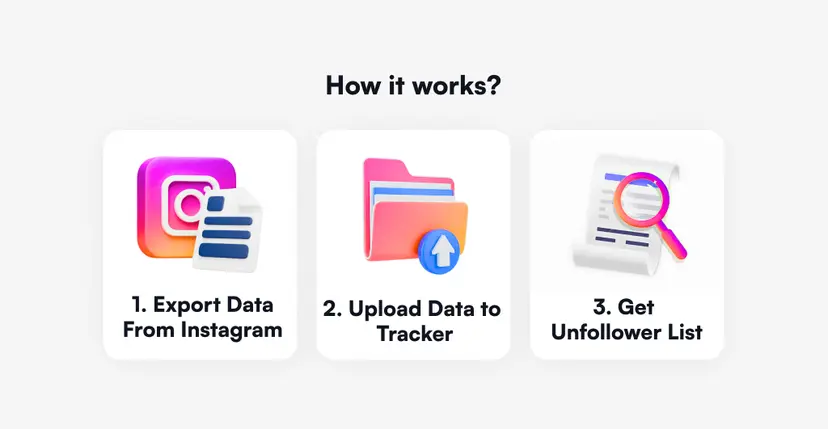
- Open Instagram → Profile → Menu (three lines) → Accounts Center.
- Go to Your Information and Permissions → Export Your Information.
- Select the profile to export.
- Choose Device as the destination.
- Set format to JSON. Set date range to All Time.
- Under "Choose specific information," uncheck everything except Followers and Following.
- Tap Save and Start Export. Wait for the email notification.
- Download the ZIP file from the email link.
- Upload the ZIP to the Unfollowers Tracker.
- Review the full list of unfollowers with exact dates.
The tracker shows who unfollowed, when they unfollowed, and patterns over time. Use the date data to correlate unfollows with specific posts or campaigns.
Instagram's built-in deactivated accounts filter
Instagram now surfaces deactivated accounts directly:
- Go to your profile → tap your follower or following count.
- Look for the "Deactivated Accounts" section at the top of the list.
- Review and remove accounts that no longer exist.
Who to remove first
| Account type | Why remove | Priority |
|---|---|---|
| Deactivated accounts | Zero engagement, inflate count | Remove immediately |
| Spam / bot accounts | Hurt credibility, zero engagement | Remove immediately |
| Mass-follower accounts (999+ following, no posts) | Never see your content | High |
| Accounts from unrelated regions or languages | Low relevance, low engagement | Medium |
| Real but completely inactive accounts | Drag down engagement rate | Review case by case |
Safe removal pace: no more than 50–100 removals per day, spread across several sessions. Aggressive bulk removal can trigger Instagram's automation flags.
Step 2: Clean your following list (5 minutes)
What you follow shapes what Instagram shows you. A cluttered following list fills your feed with content you scroll past — and the algorithm interprets that scrolling-past behavior as a signal about your preferences.
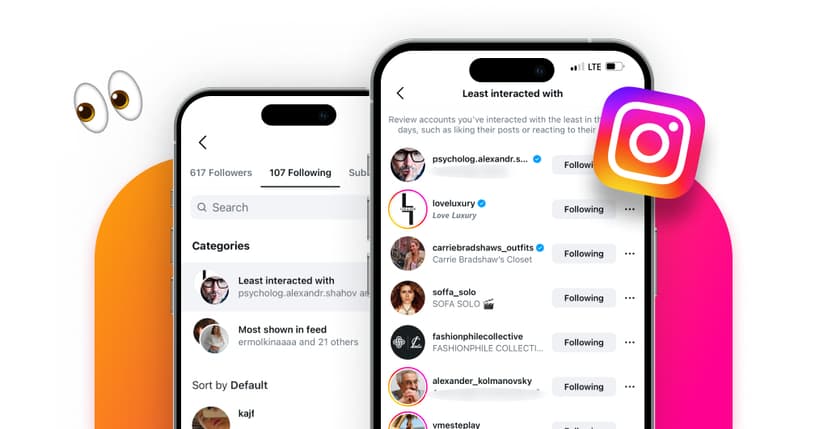
Use Instagram's built-in sorting
- Go to your profile → tap Following.
- Use the sort filter and select "Least Interacted With."
- Review the accounts that appear — these are profiles whose content you consistently ignore.
For each account, decide:
| Action | When to use |
|---|---|
| Unfollow | Content is irrelevant or you forgot why you followed |
| Mute | You want to stay connected but their content clutters your feed |
| Keep | Content is valuable but you interact with it outside Instagram (saves, DMs, shares) |
Muting is underused. It keeps the social connection intact while removing the feed noise. The person is never notified.
Step 3: Audit your published content (7 minutes)
Your profile grid is a landing page. Visitors make a follow-or-leave decision in seconds. Old, low-quality, or off-brand posts weaken that first impression.
What to archive
- Posts with visibly lower image quality (older phone cameras, pre-2024 processing).
- Content that no longer represents your current brand, topic, or style.
- Posts that received significantly lower engagement than your average — they may signal a topic mismatch.
- Promotional posts for expired offers, past events, or discontinued products.
Archiving is better than deleting. Archived posts can be restored; deleted posts cannot.
Refresh Highlights
Highlights are often the most neglected part of an Instagram profile. Check for:
- Stories older than 12–18 months with outdated visuals.
- Highlight covers that no longer match your current brand style.
- Highlights with broken or expired content (links, offers, polls that ended).
Replace or remove anything that looks like it belongs to a different account.
Find content that caused unfollows
Upload your Instagram data export to the Unfollowers Tracker and look at the timeline. Identify dates with the highest unfollow spikes, then cross-reference with the content you published on or just before those dates.
This does not prove causation, but repeated patterns — for example, unfollows consistently spiking after promotional posts or controversial topics — give you a useful signal about what your audience tolerates.
Step 4: Reset your recommendation feed (7 minutes)
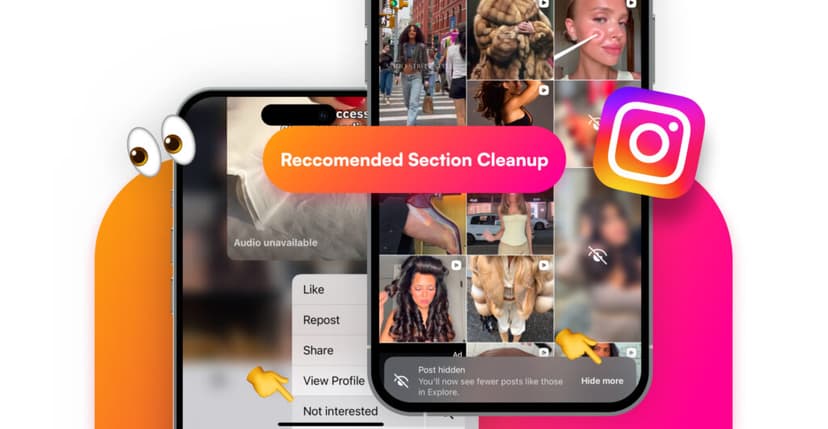
The Explore page and Reels feed are shaped by every interaction: likes, saves, watch time, even pauses. Over months, the algorithm accumulates signals that may no longer reflect what you actually want to see.
How to retrain recommendations
- Open the Explore page or Reels tab.
- Scroll through the first 2–3 screens of content.
- For any post that feels irrelevant, upsetting, or excessively time-consuming:
- Tap the three dots (top right of the post).
- Select "Not interested."
- Choose a reason if prompted.
- Repeat 20–30 times across different content types.
This is not a one-time fix. Plan to do a lighter version (10 "Not interested" taps) every two to four weeks to keep the feed calibrated.
Mute stories from low-value follows
If accounts you follow consistently post Stories that you skip past, mute their Stories rather than unfollowing. This prevents their content from occupying the Stories bar without breaking the social connection.
"The most useful cleanup is often the one nobody notices. A muted story, a removed ghost follower, a hidden recommendation — small corrections that make the remaining content work harder."
After the cleanup: what changes
A clean account does not guarantee viral posts. What it does is remove the friction that prevents good content from reaching the right people.
| Before cleanup | After cleanup |
|---|---|
| Ghost followers suppress engagement rate | Engagement rate reflects actual audience interest |
| Feed filled with irrelevant content | Feed shows content you chose to see |
| Recommendation algorithm stuck on old signals | Recommendations reset toward current interests |
| Profile grid contains outdated or off-brand posts | Profile presents a coherent, current identity |
| Unfollows happen without explanation | Unfollow patterns become visible and actionable |
The cleanup itself takes 30 minutes. The habit of maintaining it — a quick 10-minute pass once a month — is what separates accounts that plateau from accounts that keep improving.
Instagram cleanup checklist
Use this checklist to confirm you covered every area. Save it and revisit monthly.
- Reviewed and removed deactivated accounts from follower list.
- Identified and removed spam and bot followers.
- Checked for ghost followers: inactive accounts, purchased followers, abandoned profiles.
- Uploaded data export to Unfollowers Tracker and reviewed unfollow timeline.
- Sorted following list by "Least Interacted With" and unfollowed or muted irrelevant accounts.
- Archived posts that no longer match current brand or quality standards.
- Refreshed Highlights: removed outdated stories, updated covers.
- Cross-referenced unfollow spikes with published content to identify patterns.
- Marked 20–30 Explore/Reels posts as "Not interested" to reset recommendations.
- Muted Stories from accounts that clutter the Stories bar.
- Set a calendar reminder for the next monthly maintenance pass.
Frequently Asked Questions
How often should I do an Instagram cleanup?
A full 30-minute audit once per quarter is a good baseline. Between full audits, a 10-minute monthly pass — checking for new ghost followers and resetting a few recommendations — keeps the account from drifting back.
Will removing followers hurt my account?
No. Removing inactive or fake followers improves your engagement rate, which is the metric the algorithm actually uses to distribute content. A smaller, active audience outperforms a larger, dead one.
Can I get shadowbanned for unfollowing too many people?
Instagram flags rapid, repetitive actions as potential automation. Stay under 50–100 unfollows per day, spread across sessions, and you will stay within safe behavior patterns.
Should I delete old posts or archive them?
Archive first. Archived posts are hidden from your profile but can be restored. Deletion is permanent. Only delete content you are certain you will never need again.
How do I know which content caused unfollows?
Use the Unfollowers Tracker to see exact unfollow dates. Compare those dates with your posting history. Repeated patterns — such as spikes after promotional posts — reveal content types your audience resists.
Does cleaning recommendations actually work?
Yes, but it is not instant. Marking 20–30 items as "Not interested" shifts the algorithm noticeably within a few days. The effect fades if you do not repeat it periodically, because the algorithm continuously updates based on new behavior.
Can ghost followers hurt my Instagram reach?
Yes. Ghost followers lower your engagement rate, which is one of the primary signals Instagram uses to decide how widely to distribute a post. An account with a high ghost-to-active ratio looks like it produces content nobody cares about, even if the real audience is engaged. Cleaning ghost followers is the fastest way to correct that signal.
What percentage of my followers should be active?
There is no official threshold, but industry benchmarks suggest that at least 15–25% of your followers should interact with your content regularly — through likes, comments, saves, shares, or story views. If fewer than 10% show any activity, your follower list likely contains a significant share of ghost or inactive accounts.
What is the difference between inactive followers and fake followers?
Inactive followers are real people who once used Instagram but stopped engaging — they abandoned the app, lost interest in your niche, or simply scroll without interacting. Fake followers were never real users to begin with: they are bot-created accounts, often from purchased follower packages, with no genuine activity. Both types drag down engagement rate, but fake followers also carry a credibility risk if a brand partner or audience member notices them.
Tags: #instagram cleanup #instagram audit #ghost followers #follower management #account optimization

Track Your Instagram Unfollowers
Discover who stopped following you and optimize your growth strategy with our free tool.
Discover Unfollowers