Who Can See My Activity on Instagram?
Your Instagram activity is more visible than you think. In 2026, likes, comments, and reposts can appear in your followers' Friends tab on Reels — complete with your avatar and interaction type. The old Following Activity tab is gone since 2019, but Instagram replaced passive snooping with active social signals that broadcast your behavior by default. The good news: every visibility feature has an off switch if you know where to find it.
The question "who can see my activity on Instagram?" has become more complicated with every platform update. In 2019, Instagram removed the Following Activity tab that let anyone spy on your likes and follows in real time. Users assumed that meant more privacy. Instead, Instagram gradually introduced new features — the Friends tab, activity bubbles, reposts to feed, and promoted comments — that surface your behavior in different, sometimes more prominent ways.
This guide maps every type of Instagram activity to exactly who can see it, where it appears, and how to turn it off.
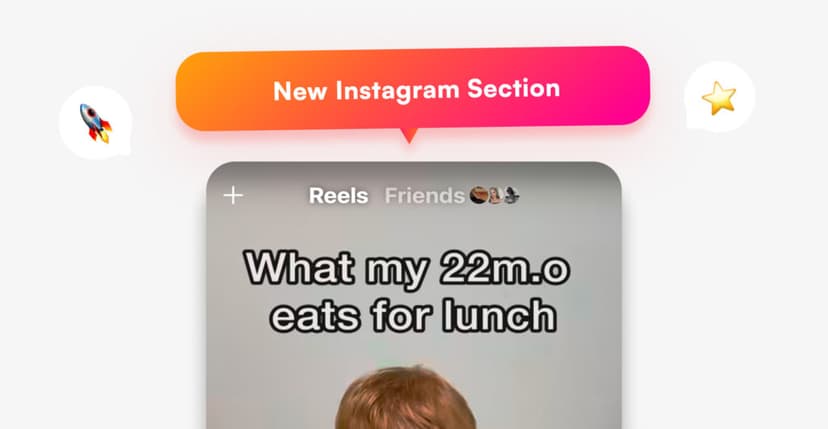
The complete Instagram activity visibility matrix
Before adjusting any settings, here is every action you take on Instagram and who can see it in 2026.
| Activity | Who can see it | Where it appears | Can you hide it? |
|---|---|---|---|
| Likes on posts | Post owner + anyone viewing the post | Like list under the post | Hide like count (posts only, not Reels) |
| Likes on Reels | Followers (via Friends tab) | Friends tab + activity bubbles | Yes — Settings → Friends |
| Comments on public posts | Everyone | Below the post, sometimes promoted | Delete comment only |
| Comments on Reels | Followers (via Friends tab) | Friends tab + activity bubbles | Yes — Settings → Friends |
| Reposts to feed | Your followers | Your profile Reposts tab + followers' feeds | Remove individual reposts |
| Story views | Story owner only | Viewer list (24 hours) | No — viewing always logged |
| Story likes | Story owner only | Notification to story owner | No |
| Saves (bookmarks) | Only you | Your Saved collection | Already private |
| Following / unfollowing | No notification sent | Visible on profile follower counts | No native notification |
| Activity status (green dot) | Mutual follows + DM contacts | DM inbox | Yes — Settings → Activity Status |
| Typing indicator in DMs | DM recipient | Chat thread | No |
| Read receipts in DMs | DM sender | Chat thread | No |
The pattern: content you create (posts, Stories, Reels) is public by design. Actions you take on other people's content (likes, comments, reposts) are now partially visible through the Friends tab and activity bubbles — features most users never realized were broadcasting their behavior.
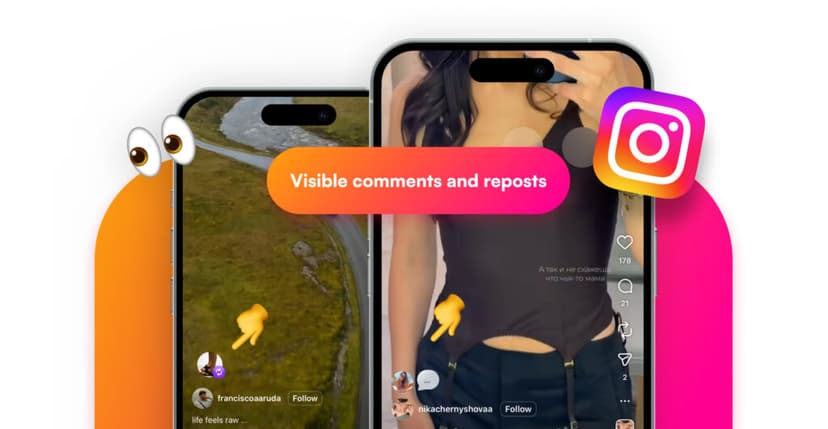
The Friends tab: Instagram's biggest activity exposure
The Friends tab launched globally in August 2025 and sits at the top of the Reels page. It is a dedicated feed showing public Reels that your friends have liked, commented on, reposted, or posted themselves.
What the Friends tab reveals
When you like a Reel, comment on it, or repost it, that action can appear in your followers' Friends tab — with your profile picture and interaction type displayed directly on the content.
| Signal shown | What followers see | Example |
|---|---|---|
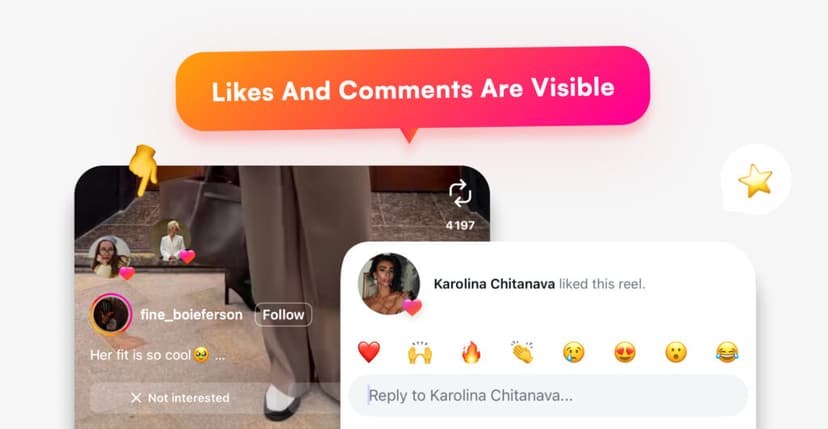
| Like | Your avatar + "Liked" label on the Reel | Friend sees a Reel you liked while browsing their Friends feed |
| Comment | Your avatar + "Commented" label | Friend sees a Reel you commented on, with your comment highlighted |
| Repost | Your avatar + "Reposted" label | Friend sees a Reel you shared to your feed |
| Post | Your avatar + "Posted" label | Friend sees your original Reel in their Friends feed |
This is a significant privacy shift. Before the Friends tab, liking a Reel was essentially invisible to your followers — only the Reel's creator could see your username in the like list. Now, that like is broadcast to everyone who follows you.
Activity bubbles
Activity bubbles are the small floating profile icons that appear on posts and Reels in your main feed and the Reels tab. They show which of your friends liked or commented on a piece of content — tiny circles with your followers' faces bouncing near the post.
These bubbles appear by default and many users do not realize they exist until a friend mentions seeing their activity.
Did You Know? The Friends tab only shows activity on public Reels and posts. If you like or comment on content from a private account, that activity does not appear in anyone's Friends tab. This means switching to a private account is the most effective way to keep all your activity hidden from the Friends tab.
How to hide your activity from the Friends tab
Instagram provides a direct setting to control Friends tab visibility. This is the single most impactful privacy change you can make in 2026.
Step-by-step instructions
- Open Instagram and go to your profile.
- Tap the menu (three lines) in the top right corner.
- Tap Settings and Privacy.
- Scroll to Friends (under "How others can interact with you").
- Go to Actions.
- Change "Who can see your activity" from Mutual followers to Nobody.
Once set to Nobody, your likes, comments, and reposts stop appearing in anyone's Friends tab. The Reels themselves are still public — your activity on them simply becomes invisible to your followers.
How to disable activity bubbles separately
Activity bubbles are controlled through a different setting: go to Settings and Privacy → Content Preferences → enable "Hide all activity bubbles in feed and reels." This removes the floating profile icons from your feed. Note: this only hides other people's bubbles from your view — to prevent your face from appearing as a bubble on other people's screens, you need the Friends tab setting above.
The old Following Activity tab: what happened
Instagram removed the Following Activity tab in October 2019. This tab was a real-time feed showing every like, comment, and new follow from accounts you followed — essentially a surveillance tool built into the app.
| Timeline | Event |
|---|---|
| 2011–2019 | Following Activity tab shows friends' likes, comments, and follows in real time |
| October 2019 | Instagram removes the tab, citing low usage and privacy concerns |
| 2019–2024 | No replacement — your activity on others' content becomes largely invisible |
| August 2025 | Friends tab launches, re-exposing likes, comments, and reposts to followers |
| 2026 | Activity bubbles roll out widely, adding visual indicators to feed posts |
The irony: Instagram removed a feature that many considered invasive, then reintroduced similar visibility through a different mechanism. The key difference is that the Friends tab can be disabled — the Following Activity tab could not.
Activity status: the green dot in DMs
The green dot next to your profile picture in Direct Messages tells people you are currently active on Instagram. It appears in the DM inbox and is visible to people you follow back and anyone you have an open DM thread with.
What activity status reveals
When enabled, mutual followers and anyone you have a DM thread with can see three states: a green dot meaning "Active now," a timestamp like "Active 2h ago" or "Active today," and no status at all if you have disabled the feature.
How to turn it off
- Go to Settings and Privacy.
- Under "How others can interact with you," tap Messages and story replies.
- Tap Show Activity Status and toggle it off.
Important trade-off: disabling your activity status also hides everyone else's status from you. Instagram enforces symmetry — you cannot see others' status while hiding your own.
Likes visibility: what changed in 2026
Likes have three distinct visibility layers on Instagram, and each works differently.
Like list on posts
Anyone viewing a public post can tap the like count and see the full list of accounts that liked it. On private accounts, only approved followers can see likes. This has not changed since Instagram's early days.
Like count visibility
Instagram lets you hide the total like count on your own posts. When hidden, other users see "Liked by [username] and others" instead of a number.
| Post type | Can you hide the like count? | How |
|---|---|---|
| Feed posts (photos, carousels) | Yes | Advanced Settings before posting, or three-dot menu after |
| Reels | No | Like counts on Reels cannot be hidden |
| Stories | N/A | Story likes are private by default |
Likes in the Friends tab
This is the new layer. Even if you hide the like count on a post, your like still appears in the Friends tab feed (unless you have set the Friends tab visibility to Nobody). The like-count toggle and the Friends tab toggle are independent settings.
Comments: more visible than ever
Comments on public content have always been visible to anyone viewing the post. What changed is how aggressively Instagram now promotes comments from followed accounts.
When you comment on a public Reel, Instagram may pin or highlight your comment for your followers who view the same Reel — making it appear at the top of the comment section. This happens without your consent and cannot be disabled individually.
The only controls available: deleting your comment (removes it everywhere, but one at a time), disabling Friends tab activity (stops comments from surfacing in followers' feeds, but the comment itself stays on the original post), and turning off commenting on your own posts (does not affect comments you leave on other people's content).
Reposts: a new activity signal
Instagram's repost feature lets you share a public post or Reel directly to your followers' feeds. Reposts appear in three places: your followers' main feed (all followers see it), a dedicated Reposts tab on your profile (visible to anyone who visits your public profile), and the Friends tab (unless you have disabled activity visibility). The original content creator also receives a notification that you reposted.
To remove a repost: find the post and tap the repost icon again, or go to your Reposts tab and remove it. Reposts do not have a blanket hide option — you can only remove them individually.
What always stays private
Some Instagram activity is completely invisible to everyone except you. No setting, no feature update, and no third-party tool can expose these actions.
| Activity | Who can see it | Why it is private |
|---|---|---|
| Saved posts and collections | Only you | Bookmarks are a personal feature |
| Story screenshots | Nobody | Instagram stopped tracking in 2018 (except View Once / Vanish Mode DMs) |
| Post screenshots | Nobody | Never tracked |
| Search history | Only you | Stored locally and in your account data |
| Explore page browsing | Nobody | Not logged as visible activity |
| Profiles you viewed | Nobody | Instagram does not show profile visitors |
| Poll and quiz responses in Stories | Story owner only | Hidden from other viewers |
| Caption and bio edits | Nobody notified | Changes visible, but no edit history or notification |
Did You Know? Instagram does not have a "profile visitor" feature and never has. Any app or website claiming to show you who viewed your Instagram profile is fraudulent. This data simply does not exist in Instagram's system.
Privacy settings audit: the complete 2026 checklist
Here is every privacy-relevant setting, where to find it, and the recommended option for maximum privacy.
| Setting | Location | Default | Private option |
|---|---|---|---|
| Friends tab activity | Settings → Friends → Actions | Mutual followers | Nobody |
| Activity bubbles | Settings → Content Preferences | On | Hide all |
| Activity status (green dot) | Settings → Messages and story replies | On | Off (disables yours and others') |
| Private account | Settings → Account Privacy | Public | Private |
| Hide like counts (own posts) | Per-post Advanced Settings | Shown | Hidden |
| Comment controls | Per-post settings | Everyone can comment | Restrict or disable |
| Story visibility | Settings → Story → Hide Story From | Everyone | Select who to exclude |
| Close Friends for Stories | Profile → Close Friends | Not set | Add trusted accounts |
Adjusting the Friends tab setting alone covers the largest share of activity exposure. Adding activity status and activity bubbles covers the rest.
How account type affects activity visibility
Your account type — personal, creator, or business — does not change the core visibility rules. However, it changes what analytics you see about your own content.
| Feature | Personal account | Creator account | Business account |
|---|---|---|---|
| Can switch to private | Yes | Yes (since 2023) | No |
| Friends tab applies | Yes | Yes | Yes |
| Activity bubbles apply | Yes | Yes | Yes |
| Insights (reach, impressions) | No | Yes | Yes |
| Follower demographics | No | Yes | Yes |
| Content interaction breakdown | No | Yes | Yes |
The critical difference: business accounts cannot be set to private. If hiding all activity is your priority and you run a business account, consider switching to a creator account, which now supports private mode.
How to track who unfollowed you
Instagram does not notify you when someone unfollows. The follower count drops by one, but you receive no alert and no information about who left.
The safest way to track unfollowers uses Instagram's official data export — no third-party login required, no API risk.
- Go to Instagram → Profile → Menu → Accounts Center.
- Navigate to Your Information and Permissions → Export Your Information.
- Select your profile, choose Device, set format to JSON, date range to All Time.
- Under "Choose specific information," select only Followers and Following.
- Tap Save and Start Export. Wait for the email.
- Download the ZIP file and upload it to the Unfollowers Tracker.
The tracker shows exactly who unfollowed, when they unfollowed, and patterns over time — data Instagram intentionally hides from the native app.
Frequently Asked Questions
Can my followers see what I like on Instagram in 2026?
Yes — if you like a public Reel or post, your followers may see that like in the Friends tab at the top of their Reels page, complete with your profile picture and a "Liked" label. You can prevent this by going to Settings → Friends → Actions and changing your visibility to Nobody.
Does Instagram still have the Following Activity tab?
No. Instagram removed the Following Activity tab in October 2019. It showed your friends' likes, comments, and follows in real time. The feature was replaced — years later — by the Friends tab on Reels, which surfaces similar activity but can be disabled.
Can someone see if I viewed their Instagram profile?
No. Instagram does not track or display profile visitors. Any third-party app or website claiming to show profile visitors is fraudulent. The only viewing activity Instagram tracks is Story views (visible to the Story owner for 24 hours).
What is the green dot on Instagram and can I hide it?
The green dot is Instagram's Activity Status indicator. It appears next to your profile picture in the DM inbox and tells people you are currently online. You can disable it in Settings → Messages and story replies → Show Activity Status. The trade-off: you also lose the ability to see others' online status.
Can someone see if I screenshot their Instagram post or Story?
No. Instagram does not notify users about screenshots of posts, Stories, Reels, or profiles. The only exception is disappearing content in Direct Messages — View Once photos/videos and Vanish Mode messages trigger a screenshot notification to the sender.
How do I hide my likes and comments from the Friends tab?
Go to Settings → Friends → Actions and set "Who can see your activity" to Nobody. This prevents your likes, comments, and reposts from appearing in your followers' Friends tab. The setting takes effect immediately.
What are Instagram activity bubbles and how do I turn them off?
Activity bubbles are small floating profile icons that appear on posts and Reels in your feed, showing which of your friends liked or commented on that content. To turn them off: go to Settings → Content Preferences → enable "Hide all activity bubbles in feed and reels." Note: this hides others' bubbles from your view — to hide your own from others, use the Friends tab setting.
Does switching to a private account hide all my activity?
Switching to private hides your posts, Stories, Reels, and follower list from non-followers. It also prevents your likes and comments on your own content from appearing in the Friends tab. However, comments you leave on public posts remain visible to anyone viewing that post, regardless of your account type.
Can Instagram business accounts be set to private?
No. Business accounts cannot enable private mode. If you need a private account with professional features, switch to a Creator account — Creator accounts support private mode and offer nearly identical analytics to business accounts.
Track who unfollows you and monitor your audience changes with the Unfollowers Tracker. For anonymous Story viewing, explore the Instagram Story Viewer.
Tags: #instagram activity #instagram privacy #friends tab #instagram likes visibility #activity status
Track Your Instagram Unfollowers
Discover who stopped following you and optimize your growth strategy with our free tool.
Discover Unfollowers