How to Download Instagram Data: Step-by-Step Guide to Track Unfollowers Safely (2026 Update)
If you've ever wondered who unfollowed you on Instagram, you're not alone. But here's the catch: most third-party apps that promise to track unfollowers require your login credentials, which violates Instagram's terms of service and puts your account at risk. The good news? There's a completely safe alternative: downloading your official Instagram data file and analyzing it with an IG unfollow tracker service.
In this guide, we'll walk you through everything you need to know about Instagram's data export feature and how to use it with a follower insights tool without any security risks.
What is an Instagram ZIP Data Export?
An Instagram data export is an official file provided directly by Instagram (Meta) that contains a comprehensive log of your account activity. Think of it as your personal Instagram diary—every follow, unfollow, like, comment, and action is documented in a structured format.
The beauty of this file is that it's created by Instagram itself, not by some shady third-party app. When you use an Instagram unfollow checker tool that works with this official data file, you're never sharing your password or violating Instagram's terms of service. You're simply analyzing data that Instagram has already given you permission to access.
What's Inside the ZIP File?
When you download your Instagram data, you'll receive a ZIP folder containing several JSON or HTML files, depending on which format you choose. For tracking purposes, you only need one specific file: the followers and following data.
This file contains:
- A chronological log of everyone who followed you
- A chronological log of everyone who unfollowed you
- Dates and times of all follow/unfollow actions
- Lists of accounts you're following
Important: This file does NOT contain your direct messages, passwords, payment information, or any other sensitive data. It's purely an activity log focused on follower relationships.
How to Download Your Instagram Data: Complete Step-by-Step Guide
The process is straightforward, but Instagram has updated its interface in 2026, so here's the most current method:
How to Download Instagram Data for Unfollower Tracker Service: Mobile and Desktop 3-steps Guide
1: Export Your Instagram Account Information
Open Instagram. Go to your Profile. Then tap the Menu. Select "Accounts Center". Here, go to "Your Information and Permissions".

And choose "Export Your Information". Select the profile you want to export data from. Choose where to export the data (select "Device").
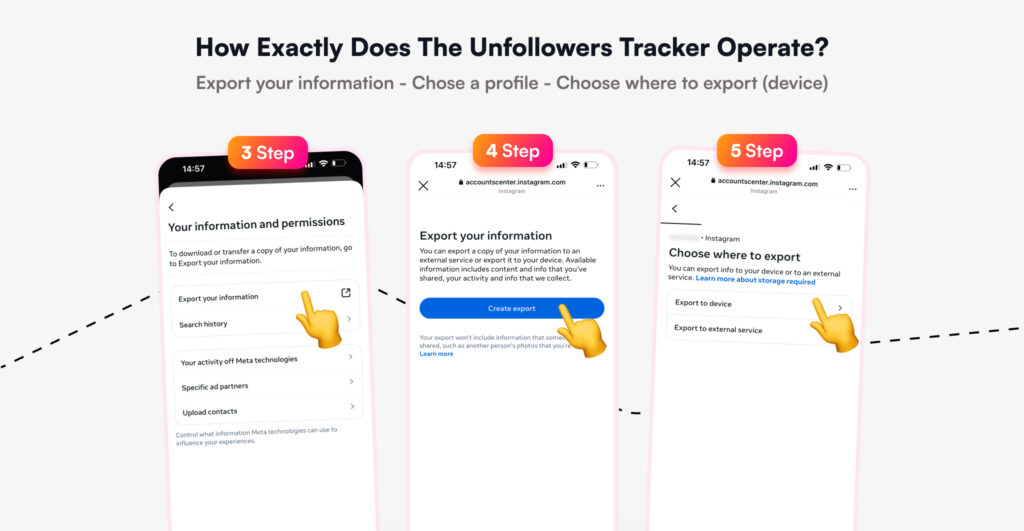
Confirm your export. In the "Format" section, select JSON. Set the Date Range to "All time".

In the "Choose specific information to export" section, uncheck all options in all sections, and tick only "Followers and Following". Tap Save and Export.

Wait for Instagram to finish exporting your data. You will receive an email notification once the data is ready. Open the email from Instagram and click "Download Your Information". The file will automatically download to your device.
How to Read Your Instagram Data Files
Once you've downloaded and extracted your ZIP file, you'll see several folders and files. Don't worry—you don't need to be a tech expert to understand them.
Understanding JSON Files
If you selected JSON format, your data will be in .json files. These are text-based files that organize data in a structured way. While they look technical at first glance, they're actually quite readable.
To open a JSON file:
- On Windows: Right-click → Open with → Notepad or any text editor
- On Mac: Right-click → Open with → TextEdit
- Better option: Use a JSON viewer online or an IG followers checker that reads these files for you
Inside the followers_and_following folder, you'll find:
- followers.json — Everyone who's followed you
- following.json — Everyone you're following
- pending_follow_requests.json — Follow requests you haven't accepted
Understanding HTML Files
If you choose HTML format, the files will open directly in your web browser and display information in a more user-friendly table format. However, most IG unfollowers tool options prefer JSON format because it's easier to process programmatically.
Using Your Data File to See Who Unfollowed You Safely
Now comes the exciting part—actually discovering who unfollowed you. While you could manually compare your followers list from different time periods, that's incredibly time-consuming and impractical if you have hundreds or thousands of followers.
This is where an Instagram account analysis tool becomes invaluable.
Why This Method is Completely Safe
Before we continue, let's address the elephant in the room: Is it safe to track unfollowers this way?
When you use a tool that works with Instagram's official data export, the answer is a resounding yes. Here's why:
- No password required: You never share your Instagram login credentials
- Official Instagram data: The file comes directly from Meta's servers
- No API violations: You're not using unauthorized third-party API access
- Complete privacy: The file contains no messages, stories, or personal content
- You control what's shared: You selected exactly what data to download
Compare this to traditional unfollower apps that ask you to "log in with Instagram"—those apps violate Instagram's terms of service and have resulted in countless account bans.
How to Use an IG Unfollow Checker with Your ZIP File

Follow these simple steps to analyze followers' data:
- Visit the Unfollowers Tracker website
Go to TheUnfollowersTracker.com - Upload your ZIP file
- Click "Discover Unfollowers" or "Upload Data"
- Select "Choose ZIP file"
- Navigate to the ZIP file you downloaded from Instagram
- Click "Open" to upload it
- Wait for processing
The tool will analyze your JSON files and cross-reference your followers and following lists. This typically takes 10-30 seconds. - View your results
You'll receive a detailed report showing who unfollowed you (with dates and times)
What You Can Do with This Information
Once you know who unfollowed you, you have several options:
- Unfollow them back: If they're not following you, you might want to clean up your following list
- Engage more strategically: Identify patterns in who unfollows you (did you post something that drove people away?)
- Identify fake followers: Spot bot accounts or inactive profiles
- Build genuine connections: Focus on accounts that actually engage with your content
Is Downloading Instagram Data Safe?
This is one of the most common questions we get, so let's address it thoroughly.
Yes, downloading your Instagram information is 100% safe. Here's why you shouldn't worry:
You Have Complete Control
When you request your Instagram data download, you choose exactly what information to include. For tracking purposes, you only need "Followers and Following"—nothing else. You can verify this by:
- Opening the ZIP file yourself before uploading it anywhere
- Reviewing the contents to confirm that it only contains follower activity
- Reading the JSON files in a text editor to see exactly what data is there
You'll quickly see that it's just a log of dates, times, and usernames—nothing sensitive or private.
It's an Official Instagram Feature
Instagram (owned by Meta, one of the world's largest tech companies) built this feature specifically to comply with data privacy laws like GDPR. They want you to have access to your data. It's your legal right.
Meta doesn't "scatter data" or compromise security—their reputation depends on data protection. When you download your information through official channels, you're using a secure, encrypted connection.
No Third-Party Access Required
Unlike traditional tracking apps that require you to log in with your Instagram credentials, the Instagram data export method requires zero third-party access to your account. You're not authorizing any app to access Instagram's API on your behalf.
The best follower insights tools work offline with your data file—they never touch your actual Instagram account.
Common Questions About Instagram Data Downloads
Can Instagram tell if I download my data?
Instagram knows you requested a download (it's in their system logs), but this is a normal, encouraged feature. There's nothing suspicious about it, and it won't affect your account standing in any way.
How often can I download my data?
You can request new downloads as often as you'd like. However, for tracking unfollowers effectively, downloading once every few weeks or monthly is usually sufficient unless you're experiencing significant follower fluctuations.
Will this work if I have a private account?
Absolutely. Your account privacy settings don't affect your ability to download your own data.
Can I download data for multiple Instagram accounts?
Yes, but you need to do it separately for each account. Log in to each account and request its data individually.
Final Thoughts
Tracking who unfollows you on Instagram doesn't have to be risky or complicated. By using Instagram's official data download feature combined with a reputable IG unfollow checker, you can safely analyze your follower relationships without ever compromising your account security.
The Instagram data file is more than just a technical curiosity—it's your key to understanding your audience better, identifying fake followers, and building a more authentic Instagram presence.
Ready to discover who unfollowed you? Download your Instagram data today and see exactly who's been leaving your profile—safely and securely.

Track Your Instagram Unfollowers
Discover who stopped following you and optimize your growth strategy with our free tool.
Discover Unfollowers