Did My Crush Unfollow Me? How to Check Without Them Knowing (2026 Guide)
Instagram does not send a notification when someone unfollows you — including your crush. The only way to know for sure is to check, and the only way to know when it happened is through your Instagram data export. This guide covers how to verify an unfollow without alerting anyone, what different unfollow scenarios mean in a romantic context, and how to respond without making the situation worse.
Checking whether your crush still follows you on Instagram feels like a high-stakes operation. You do not want to accidentally like an old photo while scrolling their profile. You do not want them to see you checking. And you definitely do not want to spend three hours analyzing their story viewer list for clues.
The good news: there are discreet, definitive ways to check. The better news: knowing the answer — even if it is not what you wanted — is almost always less painful than the anxiety of not knowing.
How to check if someone unfollowed you on Instagram
There are three methods, each with different levels of detail.
| Method | What it tells you | What it does not tell you | Discreet? |
|---|---|---|---|
| Search your follower list | Whether they currently follow you — yes or no | When they unfollowed, or why | Yes — they cannot see you searching |
| Visit their profile | Whether you still follow each other (button says "Follow" vs "Following") | When the change happened | Yes — Instagram does not notify profile visits |
| Instagram data export + Unfollowers Tracker | Who unfollowed, approximate date, and follow-unfollow patterns | The reason behind the unfollow | Yes — uses only your own data |
Method 1: Search your follower list
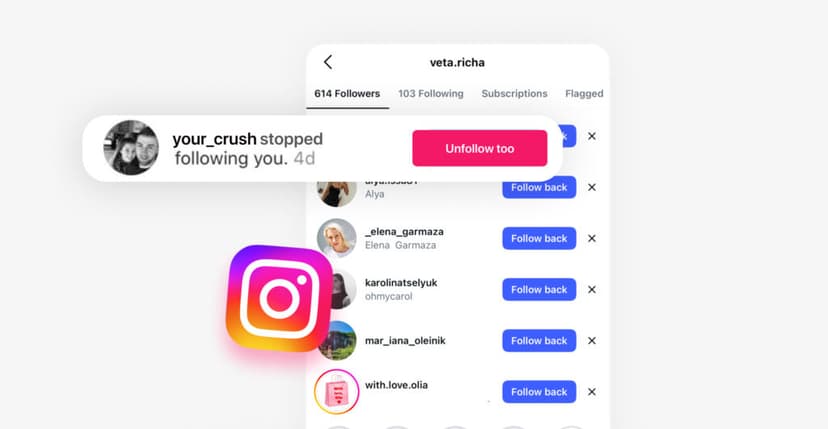
Go to your profile → Followers → search their username. If they appear, they still follow you. If they do not appear, they have either unfollowed you, been removed by Instagram (account deletion or ban), or changed their username.
To rule out a username change: search for them in Instagram's main search bar. If their profile appears under a different name, that is the explanation. If their profile appears under the same name but they are not in your followers — they unfollowed.
Method 2: Visit their profile
Navigate to their profile directly. Look at the button below their bio. "Follow" means you are not following each other. "Following" means you still follow them. If it says "Follow" and you did not unfollow them, they unfollowed you. If it still says "Following," check whether they follow you back by going to their profile → Followers → searching your name.
Important: Instagram does not notify anyone when you visit their profile. You can check as many times as you want without them knowing.
Method 3: Data export for the full picture
The first two methods confirm the current state but cannot tell you when the unfollow happened. Timing matters — an unfollow the day after you posted something is very different from an unfollow during a general feed cleanup.
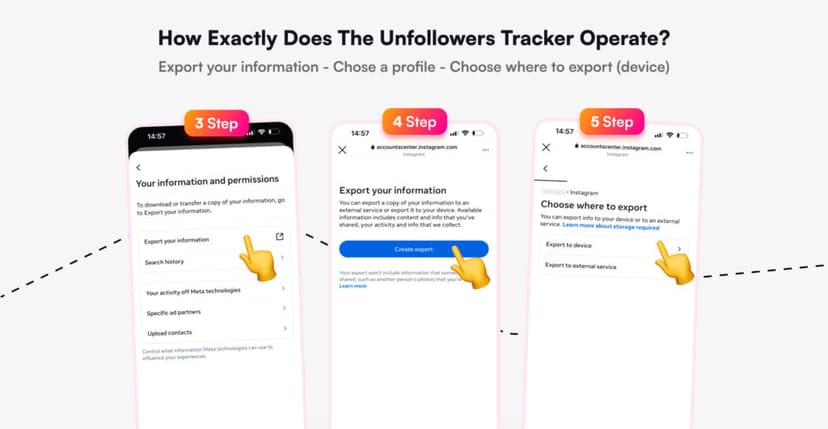
- Open Instagram → Profile → Menu → Accounts Center.
- Navigate to Your Information and Permissions → Export Your Information.
- Select your profile, choose Device, set format to JSON, date range to All Time.
- Under "Choose specific information," select only Followers and Following.
- Tap Save and Start Export. Wait for the email.
- Download the ZIP file and upload it to the Unfollowers Tracker.
The tracker shows the approximate date of the unfollow, whether they refollowed later, and the full history of follower changes — data that is completely invisible inside the Instagram app.
Early warning signs before checking
Sometimes you suspect an unfollow before you confirm it. These behavioral shifts often signal that the digital connection has changed.
| Signal | What you notice | What it may indicate |
|---|---|---|
| Disappearance from story viewers | They used to appear in your story viewer list regularly; now they are absent | They unfollowed (stories from non-followed accounts appear lower or not at all) |
| Engagement drop-off | Likes and comments on your posts from them stopped abruptly | Either unfollowed or muted your content |
| No longer in "Liked by" lists | Their name no longer appears in the like list on your new posts | They are not seeing your posts — likely unfollowed |
| Activity status invisible | You used to see their green dot in DMs; now you cannot | They turned off activity status, or you no longer have a mutual follow |
| Suggested posts from them | Instagram starts showing their content as "suggested" rather than in your feed | You may have been unfollowed, and the algorithm reclassified the connection |
None of these signals alone confirms an unfollow. Combined, they form a strong pattern. But the only definitive answer comes from checking directly.
What does it mean when your crush unfollows you?
An unfollow from a crush feels personal — and sometimes it is. But context matters more than the act itself. Here is what the most common scenarios typically indicate.
| Scenario | What usually happened | What it probably does not mean |
|---|---|---|
| Unfollowed after you posted something specific | Your post conflicted with their values, interests, or comfort level | That they hate you — one post is rarely the whole story |
| Unfollowed during a mass cleanup | They reduced their following list by dozens or hundreds of accounts | That you were specifically targeted — you were part of a batch |
| Unfollowed after you started dating someone else | They are creating emotional distance to protect themselves | That they are angry — it is often a self-care decision |
| Unfollowed and refollowed within days | Accidental unfollow, or brief emotional reaction followed by regret | That they are playing games — most refollows are genuine corrections |
| Unfollowed but still watches your stories | Emotional ambivalence — they want distance but are not ready for full disconnection | That they want to get back together — story viewing is passive, not intentional outreach |
| Unfollowed and blocked | They need complete separation — possibly related to a new relationship or personal boundary | That they hate you — blocking is often about self-control, not hostility |
| Never followed you in the first place | They saw your follow request and chose not to reciprocate | That they dislike you — many people simply keep a curated follower list |
The timing clue
The most useful piece of data is not who unfollowed but when. If you can connect the unfollow date to a specific event — a post you published, a story you shared, a real-life interaction — the context often explains the decision without any need to ask directly.
This is why the data export method matters. The first two methods tell you the unfollow happened. The data export tells you when — and "when" is where the explanation usually lives.
Did You Know? A 2025 survey found that 53% of young adults have used Instagram to "check up" on a romantic interest. You are not being obsessive by wondering if your crush unfollowed you — you are being normal. The key is how you respond to the information: with clarity and self-respect, not with impulsive messages or retaliatory unfollows.
How to respond when your crush unfollows you
What you do next matters more than the unfollow itself. Here is a framework based on the scenario.
Do nothing (usually the best option)
In most cases, the healthiest response is no response. An unfollow is a small digital action. Reacting to it — sending a message asking why, unfollowing them back out of spite, posting indirect stories about being unfollowed — escalates a non-event into a conflict.
If the person matters to you, your next interaction should happen naturally and in person — not through Instagram's DM inbox in response to a follower list change.
Unfollow them back (if it helps you)
If seeing their content in your feed causes anxiety, unfollow them. This is not petty — it is practical. You are not punishing them; you are curating your feed for your own mental health. Do it quietly, without announcements, and move on.
Have a conversation (only in specific circumstances)
A direct conversation about the unfollow is appropriate only if the person is someone you have an established relationship with — a close friend you also have romantic feelings for, or someone you are actively dating. In those cases, the unfollow represents a change in the relationship, not just a feed decision, and deserves honest communication.
Do not have this conversation over DM. Do it in person or over a call. And do not frame it as an accusation ("why did you unfollow me?") — frame it as a check-in ("I noticed we are not connected on Instagram anymore — is everything okay between us?").
Did You Know? Instagram allows users to "Remove" someone from their followers without blocking them. If your crush removed you (rather than you unfollowing them), you would stop following them without any action on your part. This is called a "soft block" and is increasingly used as a way to create distance without confrontation. You can check: if the button on their profile says "Follow" and you did not unfollow them yourself, you were removed.
What not to do
| Impulse | Why to resist it | What happens if you do not |
|---|---|---|
| Send a message asking why they unfollowed | Puts them on the spot and signals that you monitor their follower actions | Awkward conversation, possible further distancing |
| Post a passive-aggressive story | "Some people are fake" posts are transparent to everyone | You look reactive; they feel justified in the unfollow |
| Unfollow them immediately as retaliation | Reactive unfollowing escalates the situation | Both of you are now in an unfollow standoff |
| Create a second account to watch their stories | Surveillance behavior crosses a boundary | If discovered, destroys any remaining trust |
| Ask mutual friends to investigate | Involves third parties in a two-person situation | Friend group drama, loss of dignity |
The common thread: every impulsive reaction makes the situation worse. The unfollow already happened. Your response is the only thing you still control.
Frequently Asked Questions
Does Instagram notify someone when I check if they unfollowed me?
No. Instagram does not notify users about profile visits, follower list searches, or any form of checking. You can visit their profile, search for them in your followers, and review your data export without them knowing. Story views are the only activity that is logged and visible to the other person.
Can someone unfollow me on Instagram without me knowing?
Yes. Instagram sends no notification for unfollows. Your follower count decreases by one, but you receive no alert, no name, and no timestamp. Most people discover an unfollow only when they manually check their follower list or use a tracking tool.
How do I find out exactly when my crush unfollowed me?
Export your Instagram data (Profile → Menu → Accounts Center → Export Your Information → select Followers and Following → JSON format). Upload the file to the Unfollowers Tracker. The tool shows the approximate date of any unfollow, including follow-unfollow-refollow patterns over time.
What does it mean if my crush unfollowed me but still watches my stories?
This is one of the most common post-unfollow behaviors. Unfollowing removes your posts from their feed, but on a public account, they can still view your stories by navigating to your profile. It typically signals emotional ambivalence — they want less passive exposure to your content but are not ready for complete disconnection.
Should I unfollow my crush back if they unfollowed me?
Only if it genuinely helps your mental health. Unfollowing back out of hurt or retaliation usually escalates the situation. If seeing their content causes you anxiety, unfollowing is practical self-care. If you are doing it to "send a message," resist the impulse — the message it sends is rarely the one you intend.
Is it weird to check if someone unfollowed me?
No. Over half of young adults report checking up on romantic interests through Instagram. The behavior is common and human. It becomes problematic only when it turns compulsive — checking daily, multiple times per day, or obsessing over the results rather than processing them and moving forward.
What if my crush unfollowed me by accident?
Accidental unfollows do happen, especially when scrolling quickly on mobile. The clearest indicator of an accidental unfollow is a quick refollow — usually within hours or days. If they refollowed within a short window, treat it as unintentional and do not bring it up.
My crush unfollowed me — should I text them about it?
In most cases, no. Texting someone about an unfollow signals that you monitor their follower actions, which can feel uncomfortable. The exception is if you have an established relationship (close friendship, active dating) where an unfollow represents a meaningful change. In that case, address it in person, not over text, and frame it as a relationship check-in rather than a social media complaint.
Can I see if my crush is checking my profile?
No. Instagram does not show profile visitors — not for personal accounts, not for creator accounts, not for business accounts. Creator and business accounts can see total profile visits (a number) but not who visited. Any app claiming to show profile visitors is a scam.
Stop guessing and get the data. Upload your Instagram export to the Unfollowers Tracker to see exactly who unfollowed and when. For anonymous Story viewing, explore the Instagram Story Viewer.
Tags: #did my crush unfollow me #instagram unfollow #instagram crush #instagram relationship #check unfollowers
Track Your Instagram Unfollowers
Discover who stopped following you and optimize your growth strategy with our free tool.
Discover Unfollowers