Are Shadow Bans and Unfollows Actually Connected on Instagram? (2026)
No — unfollows do not cause shadow bans, and shadow bans do not cause unfollows. They are two separate phenomena with different triggers, different mechanisms, and different solutions. But they often happen at the same time, which is why creators conflate them. A shadow ban is a platform-imposed visibility restriction triggered by rule violations. A wave of unfollows is an audience behavior triggered by content decisions. This guide explains the actual mechanism behind each, shows you how to diagnose which one (or both) you are experiencing, and provides a step-by-step recovery protocol for each scenario.
Every creator who watches their reach drop while their follower count bleeds has the same thought: am I shadow banned? The timing feels too coincidental — engagement drops, followers leave, and new people stop discovering your content. It looks like Instagram is punishing you.
In almost every case, it is not. The two events share a symptom — reduced engagement — but they have entirely different causes. Treating an unfollow wave like a shadow ban wastes time on the wrong fixes. Treating a shadow ban like normal audience churn means ignoring a problem that will not resolve on its own.
This guide separates the two so you can diagnose accurately and act on the right problem.
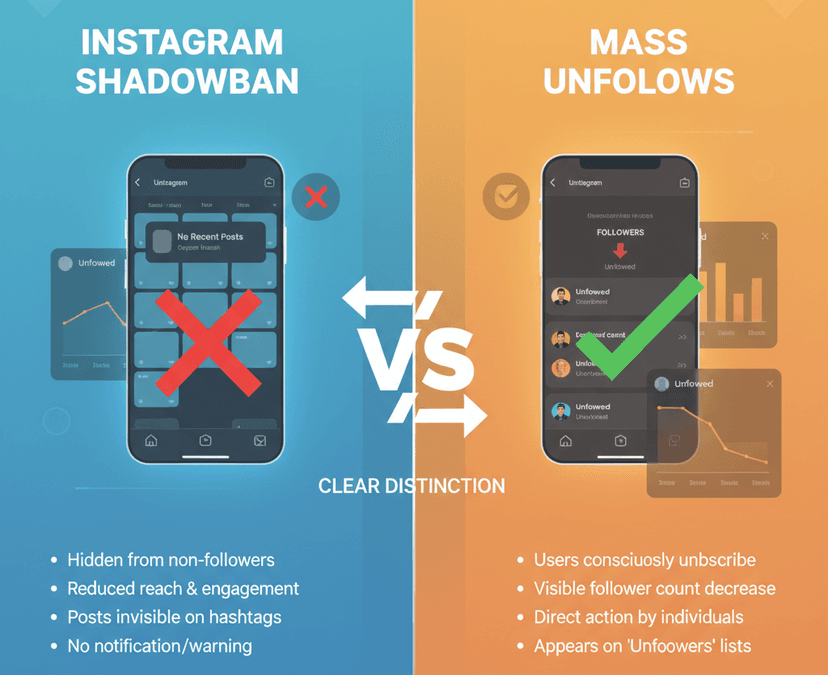
Shadow ban vs. unfollows: the fundamental difference
The confusion exists because both problems produce the same visible result — lower engagement numbers. But the mechanisms are completely different.
| Factor | Shadow ban | Mass unfollows |
|---|---|---|
| What it is | Platform-imposed visibility restriction | Audience choosing to leave |
| Who causes it | Instagram's algorithms and moderation systems | Individual users tapping the unfollow button |
| Trigger | Rule violations, spam-like behavior, banned content | Content mismatch, feed cleanup, audience churn |
| What gets restricted | Hashtag reach, Explore visibility, Reels distribution, recommendations | Nothing restricted — you simply have fewer people to reach |
| Follower count affected? | Not directly — existing followers remain | Yes — follower count drops |
| Instagram's term for it | "Reduced visibility" or "recommendation ineligibility" | No official term — it is normal platform behavior |
| Duration | 7–21 days typical; indefinite if cause is not fixed | Permanent — unfollowed accounts do not automatically return |
| Recovery method | Remove violating content, stop flagged behavior, wait | Improve content strategy, rebuild audience quality |
The critical insight: a shadow ban restricts your distribution. Unfollows reduce your audience. Both lower your engagement numbers, but fixing one does not fix the other.
What Instagram actually means by "shadow ban"
Instagram has never used the term "shadow ban" in its official communications. The platform describes the concept as "reduced visibility" or content that is "not eligible for recommendation." Understanding the official terminology helps you navigate Instagram's actual tools for diagnosing the problem.
The three levels of Instagram visibility restriction
| Level | What happens | Cause | How you find out |
|---|---|---|---|
| Recommendation ineligibility | Content does not appear on Explore, Reels tab, hashtag pages, or in "Suggested Posts" | Content violates Recommendations Guidelines (not Community Guidelines) | Account Status dashboard shows a warning |
| Reduced distribution | Content reaches fewer of your own followers in their feeds | Low engagement velocity, repeated low-quality content signals | Insights show declining reach-per-post with stable follower count |
| Content removal + strike | Individual posts removed, account receives a warning or temporary restriction | Content violates Community Guidelines (hate speech, nudity, violence, IP) | Notification from Instagram, visible in Account Status |
Most creators who believe they are "shadow banned" are experiencing Level 1 — their content is not being recommended to new audiences. Their existing followers can still see everything. This is not technically a ban; it is an algorithm deciding your content is not suitable for broad recommendation. The distinction matters because the fix is different.
Did You Know? Instagram introduced the Account Status dashboard specifically to address shadow ban confusion. You can check it right now: go to Profile → Menu → Settings and privacy → Account → Account Status. The dashboard shows whether your content is eligible for recommendations, whether any posts have been flagged, and whether any features are restricted. A green checkmark means Instagram has not imposed any visibility restrictions — if your reach is still low, the cause is content or audience quality, not a platform penalty.
Why creators confuse unfollows with shadow bans
The confusion is understandable. Both problems produce nearly identical symptoms — and they often occur simultaneously.
| Symptom | Could be shadow ban? | Could be unfollows? | How to tell the difference |
|---|---|---|---|
| Sudden engagement drop (likes, comments) | Yes — fewer non-followers seeing content | Yes — fewer followers = fewer interactions | Check if hashtag reach dropped (shadow ban) or if follower count dropped (unfollows) |
| Story views declining | Unlikely — shadow bans rarely affect Stories | Yes — fewer followers means fewer story viewers | Compare story view count to follower count percentage |
| Reels getting minimal views | Yes — Reels distribution is affected by recommendation eligibility | Partially — fewer followers reduces initial engagement signal | Check Account Status; if clean, the issue is content or audience |
| New followers stopped arriving | Yes — shadow ban kills discovery | Yes — if fewer people see your content, fewer people follow | Test hashtag visibility from a non-following account |
| Follower count dropping | Not directly | Yes — this IS the definition of unfollows | If count drops but reach-per-follower is stable, it is pure unfollows |
The engagement rate illusion
Here is why the confusion persists: losing followers lowers your absolute engagement numbers (fewer people = fewer likes) even if your engagement rate stays the same or improves. Meanwhile, a shadow ban lowers your reach even though your follower count stays stable. Both paths lead to "my posts are getting less engagement" — but the underlying data tells a completely different story.
To diagnose correctly:
- Check your follower count trend (Insights → Followers → growth chart)
- Check your reach per post (Insights → Content → individual post reach)
- Calculate engagement rate (interactions ÷ followers × 100)
If follower count is dropping but engagement rate is steady or rising → you have an unfollow problem, not a shadow ban. If follower count is stable but reach per post is dropping → you may have a shadow ban or algorithm issue.
The 9 actual causes of Instagram shadow bans in 2026
Unfollows are not on this list. These are the behaviors Instagram's systems flag for visibility reduction.
| Cause | What it looks like | Risk level | Recovery time |
|---|---|---|---|
| Using automation tools (bots, auto-likers, mass-followers) | Sudden spikes in follows/unfollows/likes at inhuman speed | Critical — can trigger permanent restriction | 14–30 days after stopping |
| Banned or broken hashtags | Using hashtags Instagram has flagged for spam or inappropriate content | High | 7–14 days after removing |
| Repeated identical hashtag sets | Copy-pasting the same 30 hashtags on every post | Moderate | 7–14 days after varying |
| Excessive actions in short time | Following/unfollowing/liking 100+ accounts per hour | High | 24–72 hours temporary block; repeat offenses longer |
| Content flagged by users | Multiple reports on your content from different accounts | High | Depends on review outcome |
| Violations of Recommendations Guidelines | Content about sensitive topics (even if it does not break Community Guidelines) | Moderate | 1–4 weeks after removal |
| Engagement pods or coordinated activity | Groups that like/comment on each other's posts in coordinated bursts | Moderate | 7–21 days after stopping |
| IP or device flags | Accessing multiple accounts or using VPN in flagged regions | Low to moderate | Changes with behavior change |
| Reposting without attribution | Sharing others' content without original credit | Low to moderate | Varies |
The key takeaway: every cause on this list involves your behavior on the platform. None of them involves other people unfollowing you. The algorithm evaluates what you do — not what your audience does.
Did You Know? A shadow ban can reduce your hashtag reach by up to 99% and cut new follower growth by 95%, according to creator recovery data. But the impact on your existing followers is minimal — they can still see your posts in their feed. This is why shadow bans and unfollows produce different engagement patterns: a shadow ban kills growth while preserving your existing audience, while unfollows shrink your existing audience while leaving your growth potential intact.
How to diagnose your situation: the 5-minute audit
Before taking any action, determine which problem you actually have. This audit takes five minutes and prevents you from applying the wrong fix.
Step 1: Check Account Status
Go to Profile → Menu → Settings and privacy → Account → Account Status. Look for any warnings about recommendation eligibility, content violations, or feature restrictions.
- Green checkmarks everywhere: No shadow ban. Your problem is content, audience, or timing.
- Warning on recommendations: Your content has been flagged. Read the specific violation and address it.
- Content removed: One or more posts violated Community Guidelines. This may affect overall account standing.
Step 2: Test hashtag visibility
Create a new post with a low-competition, niche-specific hashtag (something with under 10,000 total posts). After 30 minutes, search that hashtag from a different account that does not follow you. If your post appears — no shadow ban. If it does not — your hashtag reach has been restricted.
Step 3: Check follower trends
Open Insights → Total Followers → see the growth chart for the last 30 days. A steady decline indicates audience churn. A sudden cliff drop indicates either a bot purge by Instagram or a content event that triggered mass unfollows.
Step 4: Compare reach to follower count
| What you see | Diagnosis | Action |
|---|---|---|
| Follower count dropping, reach per follower stable | Unfollow problem — audience is leaving but algorithm treats you normally | Focus on content quality and audience retention |
| Follower count stable, reach per post dropping | Possible shadow ban or algorithm downrank | Check Account Status, test hashtags, review recent content |
| Both dropping simultaneously | Compounding problem — address shadow ban first, then audience | Fix violations first, then rebuild content strategy |
| Both stable but engagement per post is low | Content quality issue — algorithm is fine, audience is present but not engaging | Experiment with formats, posting times, hooks |
How to fix a shadow ban (step-by-step recovery)
If your audit confirms a visibility restriction, follow this protocol.
| Step | Action | Timeline |
|---|---|---|
| 1 | Check Account Status and address any flagged content — remove or appeal | Day 1 |
| 2 | Stop all automation tools, engagement pods, and mass-action behavior immediately | Day 1 |
| 3 | Remove banned or overused hashtags from recent posts (edit captions) | Day 1–2 |
| 4 | Reduce posting frequency to once per day maximum | Days 1–7 |
| 5 | Post only original, high-quality content with varied, niche-relevant hashtags (5–15 per post) | Days 1–14 |
| 6 | Engage authentically — respond to comments, DM conversations, interact with niche accounts manually | Days 1–21 |
| 7 | Retest hashtag visibility every 3–4 days using the method above | Days 7–21 |
| 8 | Once hashtags are visible again, gradually increase posting frequency | Days 14–30 |
Most shadow ban recoveries take 7–21 days. If restrictions persist after 30 days, submit a support request through the Account Status dashboard — there may be a deeper issue that requires manual review.
How to fix an unfollow problem (different protocol entirely)
If your audit shows a clean Account Status but dropping follower count, the problem is audience — not platform restrictions. This requires a content strategy fix, not a compliance fix.
| Step | Action | What it addresses |
|---|---|---|
| 1 | Export your Instagram data and upload to the Unfollowers Tracker | Identifies who unfollowed and when — correlates with specific content |
| 2 | Analyze which posts preceded the largest unfollow waves | Reveals content that triggered departures |
| 3 | Check the departed accounts — were they ghost followers, bots, or active engagers? | Determines whether the loss was meaningful |
| 4 | Audit your recent content against your top-performing posts | Identifies content drift from what your audience expects |
| 5 | Clean ghost followers manually (30–50/hour, max 150/day) | Improves engagement rate by removing non-engaging accounts |
| 6 | Post niche-reinforcing content for the next 2 weeks | Signals to the algorithm and your audience what your account is about |
| 7 | Track results weekly with new data exports | Measures whether the bleeding has stopped |
For a detailed ghost follower removal protocol, see our Instagram cleanup guide.
Did You Know? Instagram periodically removes fake, inactive, and spam accounts from the platform in bulk purges. Adam Mosseri has stated that follower drops caused by these purges do not affect reach — the accounts removed were never engaging with your content. If you see a sudden follower drop across your entire niche (not just your account), check whether Instagram announced a platform-wide cleanup before assuming either a shadow ban or a content problem.
The compounding scenario: when both happen at once
In the worst case, a creator experiences both a shadow ban and an unfollow wave simultaneously. This typically happens when:
- You use automation tools (triggers shadow ban)
- The automation attracted low-quality followers (bot followers or non-niche audiences)
- Instagram purges the bot accounts (mass unfollows)
- Your engagement rate craters from both the shadow ban and the follower loss
The fix: address the shadow ban first (compliance), then the audience quality (content strategy). Trying to grow your follower count while shadow banned is futile — the platform is actively restricting your discovery. Fix the restriction, then rebuild.
Frequently Asked Questions
Do unfollows cause shadow bans on Instagram?
No. Instagram has confirmed that unfollows do not trigger visibility restrictions. Shadow bans (officially called "reduced visibility" or "recommendation ineligibility") are caused by violations of Community Guidelines or Recommendations Guidelines, spam-like behavior, use of automation tools, or banned hashtags. Unfollows change your audience metrics but do not trigger any algorithmic penalty.
How do I know if I am shadow banned or just losing followers?
Check three things: your Account Status dashboard (Profile → Settings → Account → Account Status) for any warnings, your hashtag visibility (post with a niche hashtag and check from a non-following account), and your follower trend in Insights. If Account Status is clean and hashtags are visible, you are not shadow banned — your engagement drop is caused by audience changes, not platform restrictions.
How long does an Instagram shadow ban last?
Most shadow bans last 7–21 days after you stop the behavior that caused them. Minor violations (overused hashtags, temporary spam-like activity) resolve faster. Serious violations (automation tools, repeated guideline violations) can persist for 30+ days. If you do not address the underlying cause, the restriction can be indefinite.
Can losing followers lower my reach even without a shadow ban?
Yes — and this is the most common scenario creators misdiagnose. Fewer followers means fewer people to see your content, which produces fewer likes, comments, and shares. This lower engagement can cause the algorithm to reduce distribution — not as a penalty, but because the content is generating less engagement signal. The fix is improving content quality and audience alignment, not shadow ban recovery.
What is the difference between Community Guidelines and Recommendations Guidelines?
Community Guidelines cover content that is prohibited entirely — hate speech, violence, nudity, harassment. Violating these results in content removal and account strikes. Recommendations Guidelines are a higher bar for content that gets actively promoted through Explore, Reels, and hashtag pages. Content can comply with Community Guidelines but still be ineligible for recommendation — for example, content about sensitive topics, clickbait, or low-quality reposts. This distinction is what creates "shadow ban" experiences: your content stays up, but it stops being recommended.
Does Instagram's Account Status tool catch all shadow bans?
The Account Status dashboard catches official recommendation restrictions and content violations, but it may not reflect all forms of algorithmic downranking. If your Account Status shows green checkmarks but your reach is still suppressed, the issue may be content quality signals rather than a formal restriction — the algorithm distributes content based on predicted engagement, and consistently low-performing content gets less distribution regardless of account status.
Should I stop posting during a shadow ban?
No — but reduce frequency. Going completely silent can delay recovery because the algorithm needs new signals to reassess your account. Post once per day with original, high-quality content and varied hashtags. The goal is to send positive signals while the restriction lifts. Avoid the temptation to post more frequently to "compensate" — high volume during a restriction can extend it.
Can Instagram shadow ban affect my stories?
Stories are generally not affected by recommendation-level shadow bans because Stories are delivered primarily to your followers, not through discovery features. Your followers will still see your Stories in their tray. However, if your account has been flagged for more serious violations, story reach to followers can be reduced. The main impact of shadow bans is on Explore, Reels distribution, and hashtag reach — all discovery channels.
How do I track unfollowers to separate audience churn from shadow ban effects?
Export your Instagram data (Profile → Menu → Accounts Center → Your Information and Permissions → Export Your Information → select Followers and Following → JSON format) and upload the file to the Unfollowers Tracker. The tracker shows exactly who unfollowed and when, allowing you to correlate follower loss with specific posts or time periods. If unfollows cluster around a specific date, check what content you posted or what behavior you engaged in around that time.
Is it true that Instagram removes bot followers automatically?
Yes. Instagram conducts periodic purges of fake, spam, and inactive accounts. These purges can cause sudden follower drops — sometimes hundreds or thousands overnight — that have nothing to do with your content or any platform penalty. If you see a large drop that coincides with industry-wide reports of follower losses, it is almost certainly a purge, not a shadow ban.
Diagnose whether your engagement drop is a shadow ban or an audience problem. Upload your Instagram data export to the Unfollowers Tracker to see exactly who unfollowed and when — then fix the right problem. For anonymous Story viewing, explore the Instagram Story Viewer.
Tags: #instagram shadowban #instagram unfollowers #instagram algorithm 2026 #reduced reach #instagram visibility #shadow ban fix
Track Your Instagram Unfollowers
Discover who stopped following you and optimize your growth strategy with our free tool.
Discover Unfollowers